Locating your Save Files for Nightingale
info
When copying or moving your Nightingale saves, you will be copying two directories with the same name. Make sure to keep them seperate, or keep a note of which directory came from where.
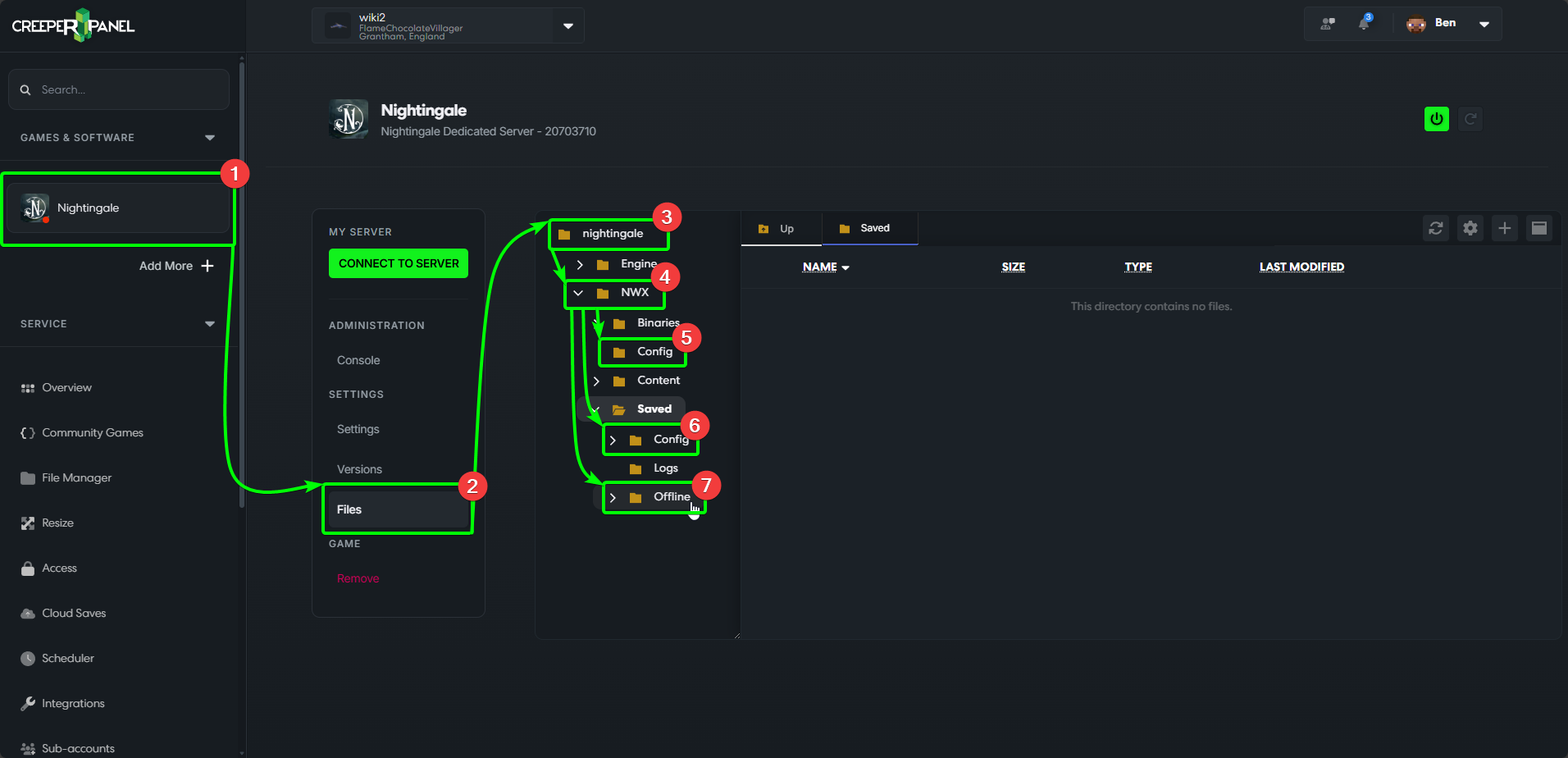
Should you want to back up, or swap your dedicated server saves, you will need to know what directories are required, and where to locate them. There are three directories in total that you will need. To start:
- Navigate to your Nightingale instance, then;
- Select
Files, underSettingsin the console's sub-menu. - Open the
nightingaledirectory. - Next, open the folder labelled
NWX. - The first directory you will need is
Config, located in the top layer of theNWXdirectory. - Next, open the
Saveddirectory insideNWX. You can find theConfigdirectory you will need here. - The last directory you need is
Offline, which is also inside theSaveddirectory.
That should be all you need for copying or replacing saves for Nightingale. Be sure to keep a note of the original location for each of the Config directories so they don't get mixed up!